Creating a social media strategy
Creating a social media strategy for a small business involves several key steps to effectively leverage social platforms to achieve your business goals. Here’s a comprehensive guide to help you develop a successful social media strategy:
1. Set Clear Goals:
– Define specific and measurable objectives for your efforts. These could include increasing brand awareness, driving website traffic, generating leads, boosting sales, or improving customer engagement.
2. Know Your Audience:
– Conduct market research to understand your target audience’s demographics, interests, behaviors, and pain points.
– Use social media analytics tools to gather insights about your existing followers and potential customers.
3. Choose the Right Platforms:
– Select social media platforms that align with your business goals and where your target audience is most active.
– Consider factors such as platform demographics, content formats, and engagement levels.
4. Create Compelling Content:
– Develop a content strategy that resonates with your audience and supports your business objectives.
– Create diverse content types, including posts, images, videos, stories, polls, and infographics.
– Maintain a consistent posting schedule to keep your audience engaged and active.
5. Optimize Your Profiles:
– Optimize your social media profiles with accurate and up-to-date information about your business, including a concise description, profile picture, cover photo, and contact details.
– Use relevant keywords and hashtags in your bio and posts to improve discoverability.
6. Engage with Your Audience:
– Foster two-way communication by responding to comments, messages, and mentions promptly.
– Encourage user-generated content (UGC) by running contests, asking questions, and featuring customer testimonials.
– Build relationships with influencers and industry leaders to expand your reach and credibility.
7. Implement Paid Advertising:
– Allocate a portion of your budget for social media advertising to amplify your reach and achieve specific objectives.
– Use targeting options to reach your ideal audience based on demographics, interests, behaviors, and location.
– Monitor and optimize your ad campaigns regularly to maximize their effectiveness and ROI.
8. Measure Performance:
– Track key performance indicators (KPIs) relevant to your goals, such as engagement rate, reach, website traffic, leads generated, conversion rate, and return on investment (ROI).
– Use social media analytics tools provided by each platform or third-party tools to analyze your performance and make data-driven decisions.
– Adjust your strategy based on insights gained from performance metrics to improve results over time.
9. Stay Up-to-Date:
– Keep abreast of social media trends, algorithm changes, and new features introduced by social platforms.
– Experiment with emerging formats and features to keep your content fresh and engaging.
10. Review and Refine Your Strategy:
– Regularly review your social media strategy to assess what’s working well and what needs improvement.
– Iterate and refine your approach based on feedback, performance data, and changes in your business environment.
By following these steps and continually refining your approach, you can create a social media strategy that effectively promotes your small business, builds brand awareness, engages your audience, and drives tangible results.
Below we present a few valuable videos that present social media and customer vs. producer relationship scenes.
Sometimes the process is really simple – Listen, Communicate, Share, Help others.
To create your own social media strategy, consider the below six steps:
- Educate yourself: social networking sites, blogs, wikis, community forums, and RSS syndication. Business leaders are experimenting with new methods to communicate in a bi-directional exchange and to engage the customer to share knowledge.
- Determine whether your target market is getting social. For many products and services, online reviews become the most sought-after and trusted source for accelerating buyer education and short-listing product finalists.
- Find out how to align your strategic objectives with tools and technologies. For example, if your goals include increasing the marketing budget ROI, generating more qualified leads, growing customer share, or decreasing customer churn, you should be able to find a direct and measurable link between social media tools and achieving your objectives.
- Leverage case studies and the successes of others to replicate your social media accomplishments.
- Start a blog. Social customers want open and transparent access to the executive ranks of their solution providers. The blog is a simple and effective communication channel to engage your target market and make a social relationship with customers.
- Start using CRM software and link to social media portals, like Zoho Social.
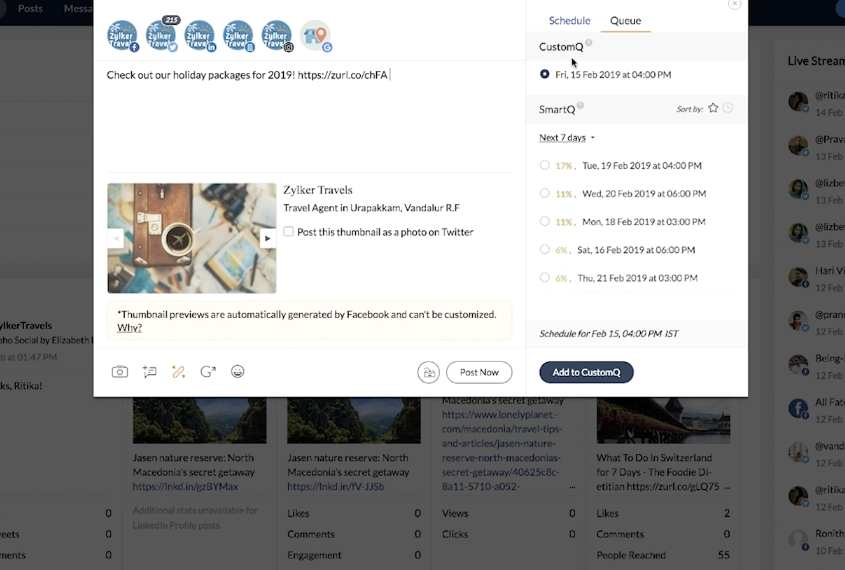
Zoho Social
is a social media management platform designed to help businesses manage and optimize their social media presence effectively. It offers a range of features and services to streamline social media marketing efforts. Here are the key services offered by Zoho Social:
1. Publishing Tools:
– Zoho Social provides tools for scheduling and publishing posts across multiple social media platforms, including Facebook, Twitter, LinkedIn, Instagram, and Google My Business.
– Users can plan their content calendar, create and schedule posts in advance, and preview how posts will appear on each platform before publishing.
2. Content Management:
– Users can organize and manage their social media content within Zoho Social, including drafts, scheduled posts, and published content.
– The platform offers a content library where users can store and reuse evergreen content, images, and videos.
3. Monitoring and Engagement:
– Zoho Social allows users to monitor their social media channels for mentions, comments, and messages in real-time.
– Users can respond to comments and messages directly from the platform, facilitating efficient engagement with their audience.
4. Analytics and Reporting:
– Zoho Social provides insights into social media performance through analytics and reporting features.
– Users can track key metrics such as engagement, reach, impressions, follower growth, and more to assess the effectiveness of their social media efforts.
5. Team Collaboration:
– The platform offers collaboration features that enable team members to work together on social media campaigns and activities.
– Users can assign tasks, exchange feedback, and collaborate on content creation within Zoho Social.
6. Social Listening:
– Zoho Social includes social listening capabilities that allow users to monitor conversations and trends relevant to their brand or industry.
– Users can set up keyword searches to track mentions of their brand, competitors, or industry topics across social media platforms.
7. Ad Campaign Management:
– Zoho Social integrates with Facebook Ads Manager to streamline the creation, management, and optimization of Facebook ad campaigns.
– Users can create and monitor Facebook ad campaigns directly within the Zoho Social platform.
8. Mobile App:
– Zoho Social offers a mobile app that allows users to manage their social media presence on the go.
– Users can schedule posts, monitor activity, and engage with their audience from their mobile devices.
Overall, Zoho Social provides a comprehensive set of services to help businesses effectively manage their social media presence, engage with their audience, and measure the impact of their social media efforts.
We help with setup and configuration. It is a part of Zoho CRMPlus.

Share this entry