• Link to WhatsApp
  • Link to X
  • Link to LinkedIn
  • Link to Instagram
  • Link to Behance
  • Call us +1 718-709-6026
Digideo ecommerce consulting
  • Services
    • eCommerce Solutions
      • Ecommerce Consulting
      • Magento ecommerce agency
      • Zoho Billing – Subscriptions
      • Zoho Inventory
    • CRM with AI
      • Zoho CRM setup and customization services
      • Zoho One – free trial
      • AI Automation for eCommerce and Service Businesses
      • Marketing Automation and AI services
      • Zoho Campaigns setup
    • Technical Support
      • Are You Looking for Successful Project Management?
      • eCommerce optimization SEO
      • Website optimization SEO
  • Success Stories
  • Resources
    • Insights & Innovations
    • Free eCommerce checklists
    • Free eCommerce e-books
  • About Us
    • How we work
  • Contact us
  • Click to open the search input field Click to open the search input field Search
  • Menu Menu
You are here: Home1 / Digideo Blog – Insights & Innovations: Transforming eCommerce & Digital Strategy2 / strategy3 / business tools4 / Streamline Your Payment Processes with Zoho Checkout: A Comprehensive ...

Streamline Your Payment Processes with Zoho Checkout: A Comprehensive Review

Small online businesses require efficient and reliable payment processing solutions. Zoho introduced Zoho Checkout, one such tool that offers a seamless and secure way to handle online payments.

Zoho Checkout

In this post, I will explore Zoho Checkout’s features, functionalities, setup process, use cases, and competitors, providing a thorough understanding of its benefits and limitations.

Zoho Checkout Features and Functionalities

Zoho Checkout is designed to simplify online payment collection for businesses of all sizes. Here are some of its key features and functionalities:

1. Customizable Payment Pages:

– Create branded, secure payment pages without any coding.
– Customize the look and feel to match your brand identity.

2. Recurring Payments:

– Set up subscription models for recurring billing. Please remember the terms and conditions of your subscription model. It should be added to the payment page.
– Automate payment collection for ongoing services.

3. Multiple Payment Gateways:

– Integrate with popular payment gateways like Stripe, PayPal, and Authorize.Net.
– Offer customers various payment options to enhance convenience.

4. PCI Compliance:

– Ensure secure transactions with PCI DSS compliance.
– Protect sensitive customer information with robust security measures.

5. Detailed Analytics:

  • Access comprehensive reports and analytics.
  • Track payment statuses, revenue trends, and customer insights.

6. Email Notifications:

  • Send automated email receipts and notifications.
  • Keep customers informed about their payment status.

7. Integrations

  • send your data directly to Zoho Cliq ( free)
  • integrate with Mailchimp, Zoho Campaigns, Slack

8. Taxes and Invoicing

  • you can add any sales or value-added taxes (VAT) to the payment
  • if you use Zoho Books, the invoices are added automatically to your Zoho Books account with the correct numbering
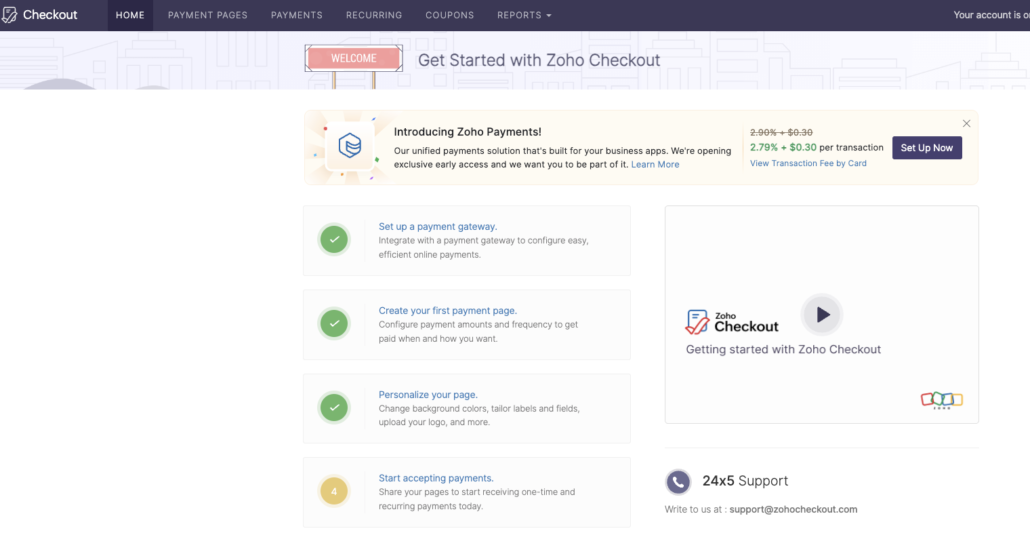
Zoho Checkout home

Setting up Zoho Checkout is straightforward and user-friendly. Here’s a step-by-step guide:

1. Sign Up and Login:

  • Visit the Zoho Checkout website and sign up for an account, or use your Zoho account.
  • Log in to your account to access the dashboard.

2. Create a Payment Page:

  • Navigate to the “Payment Pages” section and click “Create New.”
  • Choose a template or start from scratch to design your payment page.
  • Customize the fields, colors, and branding elements.

3. Configure Payment Gateway:

  • Go to the “Settings” section and select “Payment Gateways.”
  • Choose your preferred gateway (e.g., Stripe, PayPal) and enter the required credentials.
  • Test the integration to ensure it’s working correctly.

4. Set Up Recurring Payments:

  • Go to the “Recurring Payments” section if you offer subscriptions.
  • Define the billing cycle, amount, and other relevant details.
  • Enable automated billing to streamline the process.

5. Publish and Share:

  • Once your payment page is ready, click “Publish.”
  • Share the URL with your customers via email or social media, or embed it on your website.
New Payment Page | Zoho Checkout

What are the Use Cases

Zoho Checkout is versatile and can be utilized in various scenarios, including:

1. E-commerce Stores:

– Facilitate easy checkout for online shoppers.
– Accept payments for products, services, or digital downloads.

2. Subscription-Based Services:

– Automate billing for SaaS products, memberships, or online courses.
– Ensure timely payments with recurring billing features.

3. Non-Profit Organizations:

– Collect donations securely and efficiently.
– Create customized donation pages for fundraising campaigns.

4. Freelancers and Consultants like us:

– Simplify payment collection for freelance projects.
– Offer clients a professional and secure payment experience.

While Zoho Checkout is a robust solution, it’s essential to consider its competitors.

Here are some notable alternatives:

1. Stripe:

– Pros: Highly customizable, global reach, extensive developer tools.
– Cons: It requires coding knowledge for full customization and can be complex for beginners.

2. PayPal:

– Pros: Widely recognized, easy to set up, trusted by customers.
– Cons: Higher transaction fees and limited customization options.

3. Square:

– Pros: User-friendly, integrates well with physical POS systems, comprehensive reporting.
– Cons: Limited international availability, not as feature-rich for online-only businesses.

4. Authorize.Net:

– Pros: Reliable, extensive fraud prevention tools, multiple payment methods.
– Cons: Higher setup and maintenance costs and complex integration process.

5. Shopify buttons

– Pros: Reliable, extensive fraud prevention tools, multiple payment methods.
– Cons: monthly maintenance costs

Zoho Checkout is an exceptionally powerful tool for businesses seeking to streamline their payment processes.
With its customizable payment pages, support for recurring payments, multiple payment gateways, and detailed analytics, it presents a comprehensive solution for diverse payment needs.
Despite competition from other established players like Stripe, PayPal, Square, and Authorize.Net, Zoho Checkout excels due to its ease of use and seamless integration with the Zoho ecosystem.
Whether you operate an e-commerce store, a subscription-based service, a non-profit organization, or work as a freelancer, Zoho Checkout can effectively assist you in managing payments efficiently and securely. By comprehending its features, setup process, use cases, and competitors, you can confidently decide whether Zoho Checkout is the ideal fit for your business.

Contact us for a new project Book a consultation
Share this entry
  • Facebook Facebook Share on Facebook
  • X-twitter X-twitter Share on X
  • Square-x-twitter Square-x-twitter Share on X
  • Whatsapp Whatsapp Share on WhatsApp
  • Pinterest Pinterest Share on Pinterest
  • Linkedin Linkedin Share on LinkedIn
  • Tumblr Tumblr Share on Tumblr
  • Vk Vk Share on Vk
  • Reddit Reddit Share on Reddit
  • Paper-plane Paper-plane Share on Telegram
  • Mail Mail Share by Mail
  • Yelp Yelp Visit us on Yelp

Leave a Reply Cancel reply

You must be logged in to post a comment.

Table of Content

Recent
  • Turn prospects into profit 2026
    Turn prospects into profit – the customer journeyFebruary 2, 2026 - 12:01 pm
  • Composable Commerce for DevelopersDigideo
    Composable Commerce for Developers (with Magento Exampl...August 20, 2025 - 1:51 pm
  • Why Zoho CRM for ecommerce sounds reasonableDigideo
    Why Zoho CRM for ecommerce sounds reasonableAugust 20, 2025 - 12:31 pm
Popular
  • Content Marketing and Search Engine Optimization (SEO) are critical components of inbound marketingDigideo
    Content is a kingSeptember 12, 2013 - 6:01 pm
  • contact us
    Negative feedback is positiveSeptember 17, 2013 - 11:46 am
  • Turn prospects into profit 2026
    Turn prospects into profit – the customer journeyFebruary 2, 2026 - 12:01 pm
Tags
AI b2b b2b eCommerce b2c consumer content conversion crm customer journey design e-commerce ecommerce ecommerce consulting email marketing erp Google Analytics Google Analytics 4 instagram integration magento magento 2 mailchimp marketing automation marketing strategy omnichannel online shop online shopping personalization purchase report responsive design reviews sales salesforce security seo shopify social media strategy trends usability user experience woocommerce zoho zoho crm

Categories

  • consulting (13)
  • CRM (20)
  • downloads (1)
  • e-commerce (64)
  • marketing (47)
    • AI (9)
    • marketing automation (19)
    • SEM (13)
    • social marketing (9)
  • mindfulness (1)
  • privacy (1)
  • project management (4)
  • SEO (15)
  • strategy (56)
    • business tools (21)
    • consumer behaviour (28)
    • security (3)
  • usability (11)
    • UX/UI design (8)

Join our newsletter

Digideo eCommerce CRM consulting

New York, USA

+1 718-709-6026

[email protected]

Book our consultation

DesignRush - Digideo
Digideo is a Magento Association Bronze Member

Our services

  • How we work
  • eCommerce Consulting
  • eCommerce Solutions
  • Magento 2 upgrade services
  • eCommerce optimization SEO
  • Software Services
  • CRM system for your business
  • Technical Support

Consent Preferences

DSAR FORM

Our posts

  • Turn prospects into profit 2026
    Turn prospects into profit – the customer journey
  • Composable Commerce for DevelopersDigideo
    Composable Commerce for Developers (with Magento Examples)
  • Why Zoho CRM for ecommerce sounds reasonableDigideo
    Why Zoho CRM for ecommerce sounds reasonable
  • consumer reviews authencity
    Consumer reviews authenticity 2025
  • Is Magento the Best Solution to Create a Marketplace Platform (Multiple Sellers, One Store)?Digideo
    Is Magento the Best Solution to Create a Marketplace Platform (Multiple Sellers, One Store)?
© Copyright 2012-2026 - Digideo LLC - powered by Enfold WordPress Theme
  • About Us
  • Terms and Conditions
  • Terms of Support Services
  • Privacy policy
  • Cookie Policy
  • Disclaimer
  • Consultation Rescheduling Policy
Link to: What factors contribute to a good user experience in an online shop Link to: What factors contribute to a good user experience in an online shop What factors contribute to a good user experience in an online shopWhat are factors that contribute to a good user experience of an online shop, website, or appDigideo Link to: Customer journey mapping in Zoho CRM Link to: Customer journey mapping in Zoho CRM Customer journey mapping in Zoho CRMDigideoCustomer journey mapping in Zoho CRM
Scroll to top Scroll to top Scroll to top